We love to help.
How to Become a Verified Driver
Outdoorsy works hard to ensure that all members are safe, insured, and qualified to drive.
Becoming a Verified Driver is a required step to protect yourself and the vehicle you are renting on Outdoorsy. For your Protection Package to be considered active for your trip, you must successfully pass the verification process before your trip starts and meet the minimum age requirement of 21.
- Guests who are at least 21 years old may book a reservation, be verified as a driver, and be covered by Outdoorsy insurance, provided they meet the following criteria:
- Location: The listing must be located within the U.S./only for U.S. trips
- RV Value: The RV booked must have a value under $75,000
- RV Type: The RV booked must NOT be a Fifth Wheel OR Class A RV
- Insurance package: Only the Essential OR Stationary insurance packages are available for bookings made by guests under 25 (but at least 21).
- Additional Fee: The guest agrees to the additional $25/night young driver fee, to be added to the total service fees for the booking. This fee will not show as an individual line item on the receipt
- Guests aged 25 and older have no additional conditions or restrictions on their rentals, beyond meeting the general Verified Driver requirements.
- They are eligible to rent all RV types with any of the available protection packages, without the additional fees or the specific limitations on location and RV value that apply to younger drivers.
This article outlines the steps and requirements for becoming a Verified Driver and additional drivers. The Trips page will describe your current Driver Verification status and any necessary actions.
Please complete the following steps to become a Verified Driver
These steps must be completed prior to the trip beginning.
- Log into your Outdoorsy.com account and view your Upcoming Trips. Click on the booking details page and scroll down to the Guest section
- You’ll see options to Add a driver and Verify my ID
- Follow the Personal ID verification steps. Persona provides a secure platform that collects, verifies, and analyzes the identity of an individual, along with confirming the validity of their driver’s license. You will be prompted to input the country (and then state or territory, if in the U.S. or Canada) where your license was issued. You will then be prompted to upload/take photos. The photos consist of the front and back of your drivers license, along with a live photo of your face. The live face photo requires a smartphone, as you will need to follow directions on screen to turn your head to the right, left, and then back forward, in order for the system to photograph all three required angles seamlessly. It is important to note that your photos must not be blurry or too dark for us to verify them.
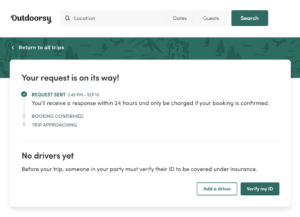
At the time the booking is sealed and paid, we run a quick proprietary analysis of the overall booking. We consider hundreds of factors, big and small when evaluating potential insurance coverage through Outdoorsy.
If you would like to add additional drivers:
-
Click “Add a driver” and submit a Name and Email address.
-
We’ll send an invitation to Accept the Trip, then login to Outdoorsy.com to complete the “Verify my ID” portion of the Driver Verification outlined above.
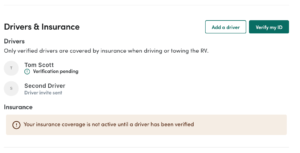
If you have failed the driver verification process, please contact our team at support@outdoorsy.com to explore the options available to you. Our team may request further documentation if it is deemed necessary.
INTERNATIONAL
For information on the process for international drivers, please see Are international travelers allowed to rent on Outdoorsy?
Help Categories
- Release notes(1)
- Stays(1)
- Campgrounds(1)
- Overall(17)
- Protection packages(10)
- Data dictionary of terms(12)
- Roadside assistance(5)
- For hosts (US)(63)
- Getting started(14)
- During a key exchange(3)
- When my RV returns(5)
- Getting 5-star RV rental reviews(1)
- For guests (US)(28)
- Rental process(8)
- Important documents(7)
- Forms(2)
- Legal stuff(6)
- Canada FAQ(3)
- For hosts (Canada)(3)
- For guests (Canada)(3)
- Before a rental request(3)
- Getting your best listing(2)
- How to(3)

